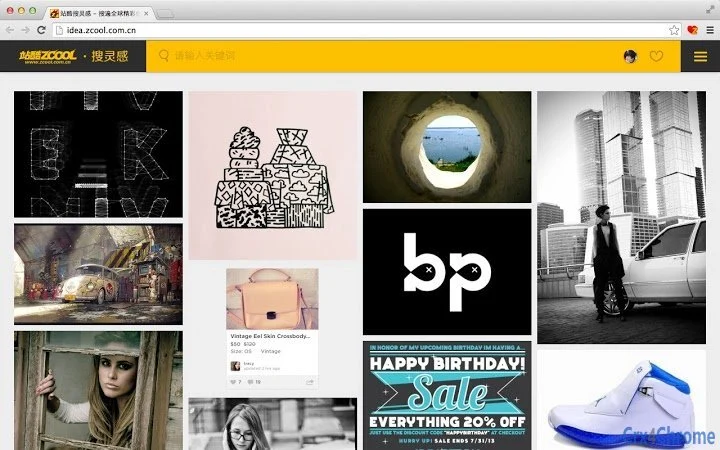

Capture & Organize Creative Inspiration Instantly
The 站酷搜灵感采集工具 is a browser extension designed to streamline the process of collecting and organizing visual inspiration from the web. It enables users to capture individual or multiple images directly from any webpage and save them to their personal "SooInspiration" collection. This tool is ideal for designers, artists, content creators, and anyone who relies on visual references for creative projects.
By integrating with a user’s ZCOOL account, it ensures that collected images are securely stored and synchronized across devices. The extension supports tagging, custom categorization, and sharing, allowing users to build a personalized library of ideas. Real-world use cases include gathering design references for a new project, saving trending visual styles from social platforms, or curating inspiration boards for team presentations.
It also fosters a community-driven experience by enabling users to explore others’ collections and discover new creative directions. The developer did not provide additional system requirements. The extension is designed for seamless integration with popular web browsers and operates within the user’s existing workflow.
Key Features & Capabilities
- Single and Batch Image Capture – Users can capture one image at a time or select multiple images in a single action. There is no specified limit on the number of images that can be collected in a batch, making it efficient for large-scale inspiration gathering.
- Cloud-Based Synchronization – Collected images are automatically synced to the user’s ZCOOL account, ensuring access across devices. This allows for continuous work flow regardless of the device being used.
- Custom Tagging and Categorization – Each saved image can be labeled and grouped into personalized folders or categories. This feature enhances searchability and supports a structured creative workflow.
- Share Across Platforms – Users can share their saved images directly to various social media platforms, promoting collaboration and community engagement.
- Access to Public Collections – The extension allows browsing of other users’ saved collections, offering a way to discover new ideas and stay updated on creative trends.
- Source Link Preservation – Each captured image retains a link to its original webpage, enabling users to revisit the source for context or attribution.
- Browser Integration – Fully compatible with Chrome-based browsers, leveraging the browser’s extension ecosystem for smooth performance and easy management.
User Interface, Workflow & Performance
The user interface of the 站酷搜灵感采集工具 is minimal and intuitive, designed to integrate seamlessly into the browsing experience. A dedicated button in the browser toolbar allows one-click access to the capture function. When activated, users can either select a single image or highlight multiple images on a page for batch collection. The workflow is streamlined—after selection, images are instantly sent to the user’s ZCOOL account and appear in the “SooInspiration” dashboard. Navigation within the dashboard is straightforward, with options to filter by tags, categories, or recent additions. The extension does not require additional setup beyond browser installation and login to a ZCOOL account. Performance observations are based on general software behavior patterns. The developer did not specify resource usage details. No performance bottlenecks were reported in the release notes. Stability is maintained through regular updates, with the latest version focusing on improved efficiency and compatibility with complex web pages.Compatibility & System Requirements
The 站酷搜灵感采集工具 is compatible with Windows, Mac, and Linux operating systems. It is designed as a Chrome extension, requiring a minimum Chrome version of 26. The installation size is 1.2 MB, which is typical for lightweight browser extensions. The developer did not specify exact system requirements beyond the OS and browser version. Compatibility information was partially provided. The extension operates within the Chrome browser environment and does not require additional software or hardware. Users are advised to ensure their browser is up to date for optimal functionality.Pros and Cons
Pros
- Effortless capture of single or multiple images from any webpage
- Cloud sync ensures access to saved content across devices
- Custom tagging and categorization enhance organization
- Direct sharing to social platforms promotes collaboration
- Access to community collections for discovery and inspiration
- Preservation of original source links for reference
- Lightweight at 1.2 MB with minimal system impact
Cons
- Only available as a Chrome extension, limiting use on other browsers
- No information provided on offline functionality
- Dependency on a ZCOOL account for full functionality
- Performance details under heavy use were not specified
- Limited documentation on advanced features
FAQ Section
Is the站酷搜灵感采集工具 available for browsers other than Chrome?
The extension is currently designed for Chrome-based browsers. No information was provided about support for other browsers such as Firefox, Edge, or Safari.
Can I use the tool without a ZCOOL account?
Full functionality requires a ZCOOL account. The extension integrates with the platform to store, sync, and share collected images.
Is the software secure and private?
The extension operates within the browser’s security model. Images are stored on ZCOOL’s servers after login. The developer did not provide detailed privacy policies or data handling practices.
How often are updates released?
Updates are released regularly, with the latest version (1.0.0) focused on performance improvements, bug fixes, and new features like user-defined categories and improved source detection.
Can I access my saved images offline?
Exact offline capabilities were not specified. Access to saved images likely requires an active internet connection to sync with the ZCOOL account.







